Lyft Pass for Public Funding
Learn more about what Lyft Pass for Public Funding is and how to create a new Lyft Pass for Public Funding program in this article.
In this article, we'll cover:
What is Lyft Pass for Public Funding?
Lyft Pass for Public Funding enables your organization to provide transportation solutions to help get riders to and from their destinations. Your organization is able to cover the ride costs for your people, while controlling the usage and cost of each program. If your organization is facilitating rides for government beneficiaries (e.g., Medicaid), then consider Lyft Pass for Public Funding. Please note that rides for staff should be set up as standard Lyft Pass programs.
You can click here to learn more about how to sign up!
What’s the difference between a Lyft Pass program and a Lyft Pass for Public Funding program?
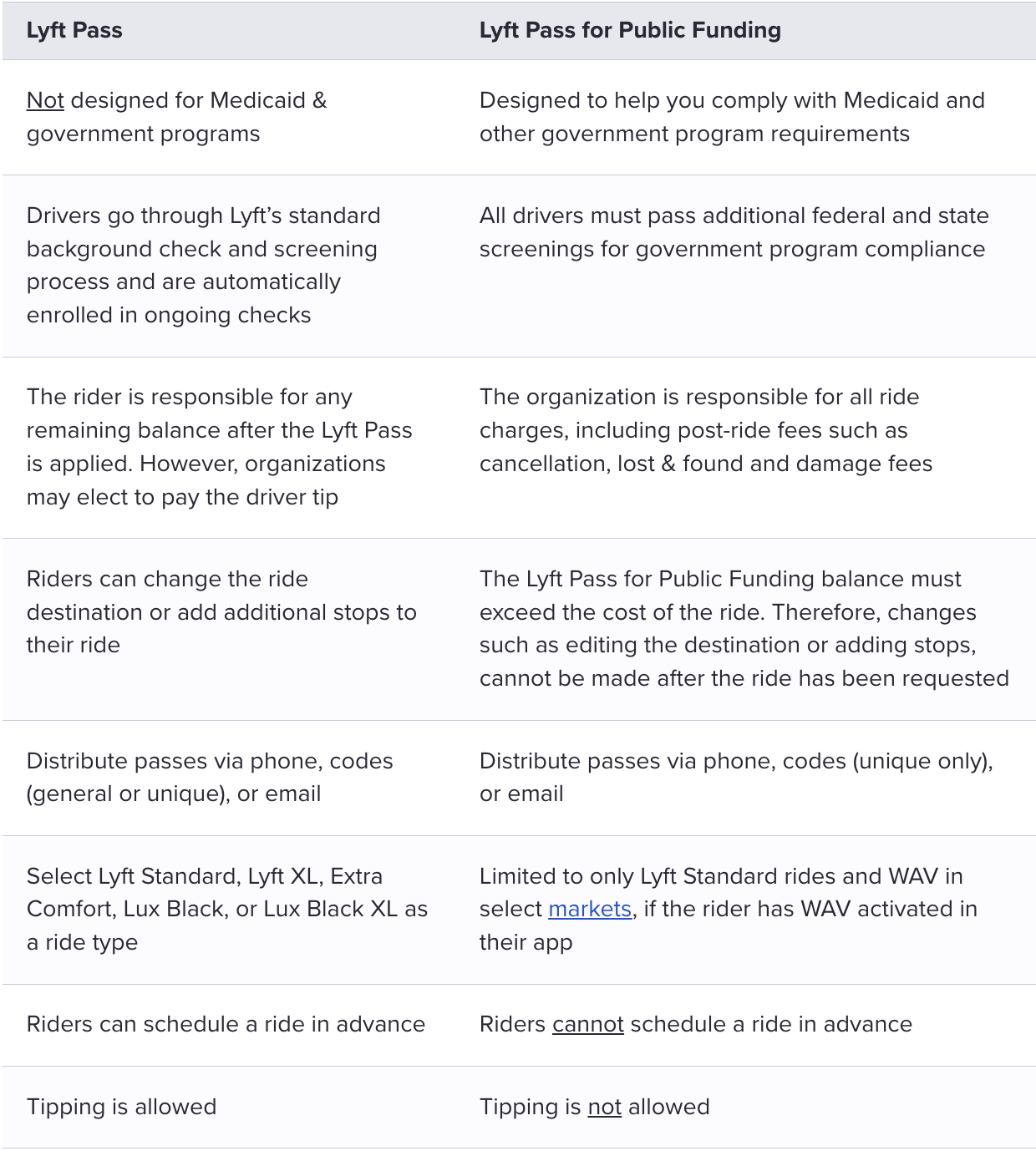
There are a few important differences between a standard Lyft Pass program and Lyft Pass for Public Funding program. The below table outlines the key differences between the two.
How to create a Lyft Pass for Public Funding program
- After you've been granted access to Lyft Pass, log in to the Lyft Business Portal
- Select 'Programs' under 'Lyft Pass' on the home page
- Select '+ Add Program' to create your new program
- If not automatically selected, check the box next to ‘Set up as a Lyft Pass for Public Funding program’
- Enter a name for your Lyft Pass in the 'Name' field
- Enter a short description of the program in the 'Description' field
- Select your sharing option via email or unique code or phone number
- Select the frequency in which you would like your benefits to reload. Pick the start date of your pass and an expiration date up to 15 months in the future
- One-time Lyft Pass: Single occurrence that expires and does not renew Recurring Lyft Pass
- Daily: Ride passes that renew on a daily basis
- Daily passes must have a required end date of 11:59 PM the same day the pass is valid in the user’s timezone
- Weekly: Ride passes that renew on a weekly basis (on Sunday of each week)
- Weekly passes must have an end date of Sunday at 11:59 PM for the corresponding week in the user’s timezone
- Monthly: Ride passes that renew every month (for use through an entire month)
- Monthly passes must have an end date of the last day of the month at 11:59 PM in the user’s timezone
- Select your benefit type, if you would like to provide a certain number of rides or credit
- Rides: Offer a specific number of rides where the cost of the ride is covered up to a specific amount. Unused credits will not roll over to the next ride. Enter in the maximum number of rides that the pass will cover in the 'Number of rides' box, the maximum number of rides per rider, and the maximum amount of the ride cost that will be covered in the 'Max $ per ride' box (i.e., 100 riders, 10 rides each, up to $15 each)
- Credits: Like cash, credits can be used on rides until the amount is $0. There is no limit to the number of rides that the user can use the credit on. Enter in the dollar amount of Lyft credit that the pass will be good for in the 'Amount' box (i.e., $50 can be used on any number of rides—one $50 ride, two $25 rides, or five $10 rides)
- Enter Time Windows
- 'Start time,' and 'End time' and 'Day of Week' - the time zone automatically adjusts to the rider’s timezone
- Select 'Ride locations' to choose the location restrictions of where your Lyft Pass rides can be taken
- Customized shapes can be added by your Lyft Account Manager
- Select your billing method and reporting methods
- Offline billing (invoicing)
- Note, only offline billing is currently available for Lyft Pass for Public Funding
- Invoice groups may also be created
- Reporting: utilization report that is sent at the beginning of each month
- Monthly (default)
- Weekly
- Daily
- Lastly, click ‘Publish!’
Your Lyft Pass for Public Funding program will be clearly labeled in your programs page and you can also filter for your program in the ‘Insights’ tab.
FAQs
Q: What happens when the ride amount exceeds my rider’s Lyft Pass for Public Funding balance or my rider requests Priority Pickup or a Lyft mode other than Lyft Standard?
The Lyft Pass for Public Funding will not apply. If a ride is requested, the rider’s personal payment method will be charged the full ride amount.