Utah Driver Information
This page provides information about vehicle, driver, and document requirements, state regulations, insurance coverage, and city-specific requirements needed to drive with Lyft in the state of Utah.
To apply to drive in Utah, submit an application online or in the Lyft Driver app –– download it from the App Store (iOS) or the Google Play store. To be approved to drive, applicants must meet these requirements.
Skip to:
What you need to drive with Lyft in Utah
Drivers are required to maintain current documents. Failing to update a required document before the expiration date results in temporary deactivation.
Use your Lyft Driver app to upload your documents. To add documents in the app, tap 'Account' in the main menu, then 'Documents.
Vehicle requirements
- 2010 or newer
- 4 doors
- 5-8 seats, including the driver's
- Not a taxi, stretch limousine, or non-Express Drive rental vehicle
- Not titled as salvage, non-repairable, rebuilt or any other equivalent classification
See if your vehicle qualifies for premium ride types to earn more on each ride.
In select cities, you can rent a car through Express Drive with standard insurance included. Rental vehicles must be rented through the Express Drive program to be approved for use on the Lyft platform.
Driver requirements
- Valid Utah driver’s license — Temporary licenses are also acceptable.
- You must be 25 years or older to drive.
- Pass a driver screening, which reviews your driving history and criminal background check. Learn more about driver screenings.
- Any smartphone that can download and run the Lyft Driver app. See phone software recommendations.
Document requirements
- Driver profile photo: Learn how to take the best photo
- Utah vehicle registration
- Personal vehicle insurance
Emblem requirements
Drivers are required to display the Lyft emblem while in driver mode. The Lyft emblem is Lyft’s official trade dress. It helps passengers and law enforcement identify your vehicle.
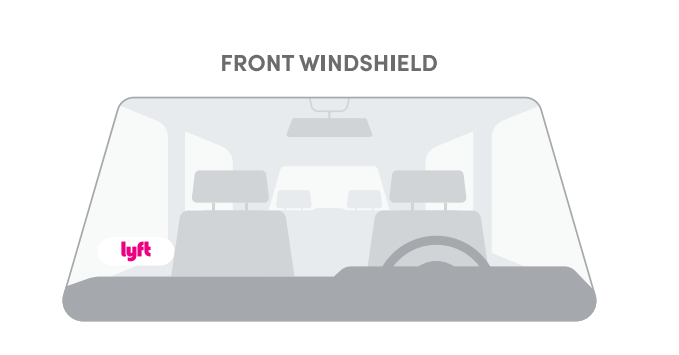
The Lyft emblem should be displayed in the lower corner of your windshield on the passenger side every time you enter driver mode. Make sure to remove the emblem when you are not in driver mode.

If you’ve just been approved to drive, you should receive your Lyft emblem shortly. If you didn't get one or need a new one, order one in your Lyft Driver app or Dashboard. While waiting for it to arrive, you may print a temporary emblem.
Utah driver regulations
Be sure to follow these rules when giving rides in Utah, and keep an eye on your email for important updates from Lyft.
Skip to:
Hourly driver mode limits
In Utah, Lyft’s standard time limit for driver mode applies.
Best practices
- Display all required emblems and placards
- Always have your driver’s license and insurance document
- Follow all airport rules
- Don't accept street hails
- Don't accept cash for rides
- Don't wait in taxi lines
Know your insurance
Review Lyft's coverage here.
For the State of Utah, Lyft's coverage is modified to provide primary liability coverage during a waiting period.*
If the vehicle you use to provide Lyft rides has a lien against it, you're required to notify the lienholder that you are using the vehicle to give Lyft rides. Using a vehicle with a lien against it to give Lyft rides may violate your contract with the lienholder.
*The waiting period is the time when a driver logs in to driver mode until the driver accepts a ride request.
Moving to or from Utah
If you're already a driver in a different state, and you're moving to Utah, send us a message with the following info:
- The date you're moving
- Your new shipping address
- Clear photos of your Utah-issued driver's license and vehicle registration
Moving from Utah to a different state? Find your new market here to see what steps you’ll need to take.